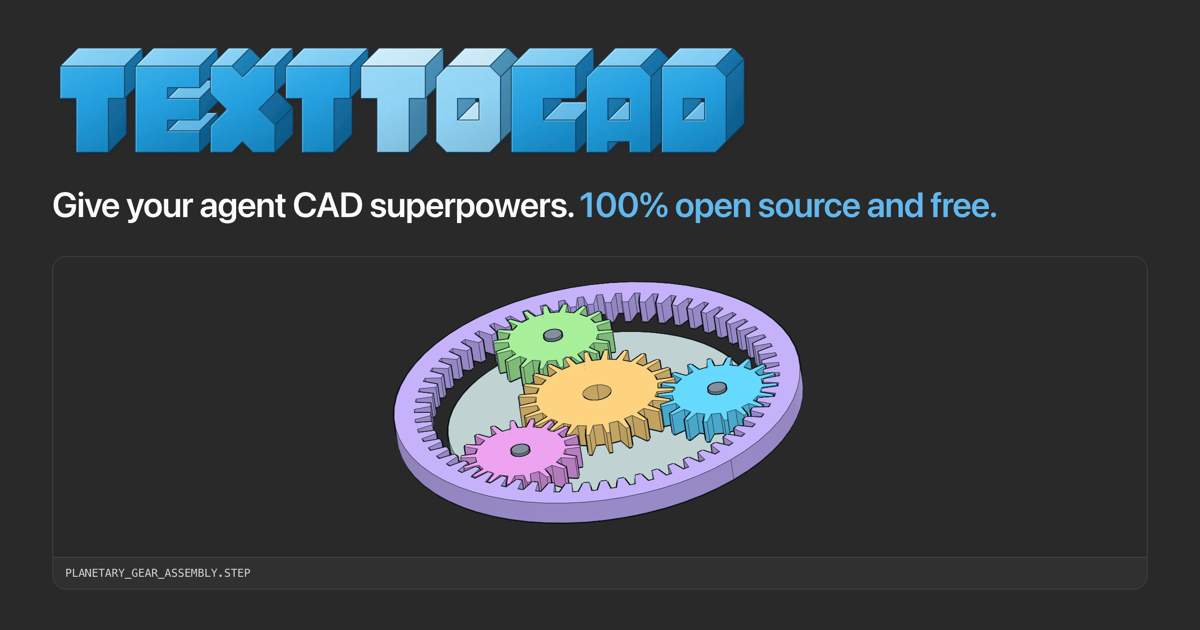











The text-to-cad plugin gives your agent local workflows for generating 3D models as STEP, GLB, STL or 3MF files. It also does design for manufacturing checks, generates engineering drawings, and connects to popular 3D printing, sheet metal and CNC fabrication services.
It is supported by all popular agents that support plugins or the skills framework, including Claude Code, Codex, Cursor, Gemini and Grok.
Send this message to your agent and it will install text-to-cad for you.
Install text-to-cad from https://github.com/earthtojake/text-to-cad
By default, text-to-cad sends usage stats and crash reports, tagged with a random
ID and never including your files, paths or prompts; turn them off with
uvx cadgen telemetry off, or ask your agent to. Telemetry says
the rest.
Or install it yourself:
- CAD runs through uv: check that it is installed
(
uv --version), and if it is missing, install it with uv's installer. - Run the commands under your agent app's heading below, or under Other Agents if it has none.
- Restart the app. Its first start downloads CAD's runtime, so it needs a network connection.
The plugin for your agent app brings the skills and CAD's viewer, a local server
(cadgen mcp). For an agent without a plugin, install the skills alone. Install
one or the other in an app, not both: two copies means every skill twice.
The install commands below take the latest branch: it holds the plugin alone
and gets each release once it is on PyPI. main, where development happens,
installs too, but can hold changes that aren't released yet. Each app names the
branch in its own way (#latest, --ref latest, @latest or
--branch latest); leave it out and the app installs main.
Each app's heading also says how to update text-to-cad, and how to reinstall it:
remove it, then install it again. Updating the plugin updates CAD: the new
release's cadgen is downloaded the first time it runs, and the skills and the
server share it. Earlier releases stay in uv's cache until you run uv cache prune.
claude plugin marketplace add earthtojake/text-to-cad#latest
claude plugin install text-to-cad@earthtojakeThe plugin also starts CAD's server. Where Claude Code can show app views, CAD shows models as viewer cards in the conversation; otherwise, as in a terminal, asking it to show a model gives you a link that opens the model in the CAD Viewer in your browser.
To update, run these, then restart Claude Code:
claude plugin marketplace update earthtojake
claude plugin update text-to-cad@earthtojake
To reinstall, remove it with these, then run the install commands again:
claude plugin uninstall text-to-cad@earthtojake
claude plugin marketplace remove earthtojakeCAD shows models in the chat: ask Claude to show one and it appears as a viewer
card you can orbit, add to your prompt, and open full size; Claude can read what
you selected and see what you see. It runs locally through uv: add the server to
Claude Desktop's config (Settings > Developer > Edit Config), then restart the
app. If Claude Desktop cannot find uvx, give its full path (which uvx).
{
  "mcpServers": {
    "cad": {
      "command": "uvx",
      "args": ["--no-config", "--managed-python", "--python", "3.13", "--from", "cadgen==0.7.21", "cadgen", "mcp"],
      "env": {"CADGEN_INSTALL_CHANNEL": "claude-desktop"}
    }
  }
}
The config pins a cadgen release in args, and uvx keeps the version it first
downloads. To update, change that version to the
latest release, then restart Claude Desktop.
Install text-to-cad from Codex's plugin directory: text-to-cad for Codex, then Open in desktop app.
In the Codex app the plugin also brings the CAD viewer: CAD in the sidebar (recent models, and Open), a CAD tab beside each thread that the agent drives, and Open with CAD for model files.
Manual install
codex plugin marketplace add earthtojake/text-to-cad --ref latest
codex plugin add text-to-cad@earthtojake
To update, upgrade the earthtojake marketplace (or use Plugins › Manage ›
Marketplace), then restart Codex:
codex plugin marketplace upgrade earthtojakeTo reinstall, remove it with these, then run the install commands again:
codex plugin remove text-to-cad@earthtojake
codex plugin marketplace remove earthtojake
The marketplace was renamed from text-to-cad to earthtojake; if you added it
before, remove the old one first (codex plugin marketplace remove text-to-cad).
Cursor also loads the plugin installed with Claude Code. If the Claude Code plugin is installed, Cursor already has text-to-cad: skip this.
git clone --depth 1 --branch latest https://github.com/earthtojake/text-to-cad ~/.cursor/plugins/local/text-to-cadCursor reads .cursor-plugin/plugin.json: restart Cursor after cloning. Teams
can import the repository instead, under Dashboard → Plugins & MCPs → Team
Marketplaces.
To update, pull the latest release, then restart Cursor:
git -C ~/.cursor/plugins/local/text-to-cad pullTo reinstall, delete the folder, then run the install command again:
rm -rf ~/.cursor/plugins/local/text-to-cadGrok Build also loads the plugin installed with Claude Code. If the Claude Code plugin is installed, Grok Build already has text-to-cad: skip this.
grok plugin install earthtojake/text-to-cad@latest --trust
grok plugin enable text-to-cad
Grok Build reads the Claude plugin manifest. Grok shows tool results as text, so asking it to show a model gives you a CAD Viewer link.
To update, run this, then restart Grok Build:
grok plugin update text-to-cadTo reinstall, remove it with this, then run the install commands again:
grok plugin uninstall text-to-cadgemini extensions install https://github.com/earthtojake/text-to-cad --ref latest --consent --auto-updateGemini installs the plugin as an extension, with the skills and CAD's server, and
keeps it up to date (--auto-update; --consent answers its security prompt). Like Grok, it shows tool results as text, so asking it to show a model
gives you a CAD Viewer link.
To update now, run this, then restart Gemini:
gemini extensions update text-to-cadTo reinstall, remove it with this, then run the install command again:
gemini extensions uninstall text-to-cadFor an agent without plugin support: the skills give you everything you need for core CAD workflows and let you view CAD files in a localhost web app. Install them with the Skills CLI:
npx skills add earthtojake/text-to-cad#latestThe command asks which agents to install for, and where. To skip the questions,
name the agent and install for your user:
npx skills add earthtojake/text-to-cad#latest -g -a <agent> -y.
Each skill runs cadgen through uv with the same pinned command the plugin's server uses, so uv must be installed. Without the plugin there is no CAD server, so the skills open models in the CAD Viewer in your browser.
To update or reinstall, run the same command again, then restart the app.
add re-fetches the package and overwrites what is already installed, so it both
refreshes existing skills and installs any skill added in a newer release.
npx skills update only refreshes skills already in your lockfile, so it silently
misses new ones — which matters here, because releases do add skills.
Neither command removes a skill that was retired upstream; drop one with
npx skills remove <skill> if you need to. The retired cad-viewer skill is
now covered by the CAD, DXF and robot-description skills, and the retired
cad-mcp-setup by this README's install and update steps. Remove old standalone
installs with npx skills remove cad-viewer cad-mcp-setup.
No plugin for your agent yet? Request one.
To update, ask your agent to update text-to-cad, or run the update commands under your app's heading, then restart the app.
When a newer release is out, a copy you installed yourself says so: a blue update button, first in CAD's navbar and on its home, whose Send to agent posts "Update text-to-cad to 0.9.0 from https://github.com/earthtojake/text-to-cad" to your chat, worded like the install message (the browser viewer's copies it instead), or, in an app that shows CAD's replies as text, a line with its reply. Your agent then runs the update commands under your app's heading here. The button also links to the install instructions, to update by hand. Copies from a plugin directory or the Cursor Marketplace never show it, since their store updates them, and neither does Gemini's extension, which Gemini updates: for those there is nothing to run.
To find out, cadgen fetches api.texttocad.dev/v1/versions at most once a day:
one anonymous request, with no ID, path or anything about you, never in CI and
never for a copy that something else updates. CADGEN_UPDATE_CHECK=0 turns it off.
The CAD app (the plugin's cad server), the browser viewer (cadgen viewer) and the build daemon that builds for
them and for every cadgen command send usage stats by default, tagged with a random install ID: versions, where
you installed it from (as the plugin's CAD app names it, noted in cadgen's state folder for the other two), your OS
and agent app, and counts -- how often each CAD tool was called and why a call failed
(one of a fixed set of words, such as "no file at that path" or "no view open", never its message), how often views
were used, how many files of each format were shown, how many models were built and snapshots rendered, how those ended,
why one failed (again a fixed word, such as "the model's code raised" or "the geometry kernel refused", never its
message) and how long they took, which features were used -- added up over a few minutes before they are sent, each
batch under a random ID of its own and the time it was made, so one sent again is counted once. When cadgen's own
code fails, they also send a crash report: the error's type and where in cadgen (or Python, or one of its
dependencies) it failed, never its message, and with any of your own code a bare placeholder. Our server adds the country each request
comes from (worked out from its IP address, which it doesn't keep) and stores it all with PostHog. Never file names,
paths, contents or prompts. The first cadgen command says so once, and sending starts then. Turn it off, which
also deletes what was sent, with uvx cadgen telemetry off, Share usage stats in either app's menu (the logo at
the top left, over any model), or by asking your agent. DO_NOT_TRACK=1 or CADGEN_TELEMETRY=0 turns it off for
one process, and CADGEN_TELEMETRY=1 on, without changing your setting; nothing is sent by default in CI or from a
development install. Nothing waits to send: what a command counts without the build daemon, and what any part of
cadgen counted since its last send when it exits, waits in small files in cadgen's state folder until the next part
of cadgen sends it in the background; turning telemetry off deletes them.
Offline, nothing is sent and everything works. See
the privacy policy.
The CAD kernel behind the cad, dxf, urdf, srdf and sdf
skills is OCP, OpenCascade's Python binding, and its wheel ships an unsigned
native module. Windows 11's Smart App Control blocks unsigned native code, so
on a machine where it is on (the default on a fresh install) every cadgen
command and import build123d fails with
ImportError: DLL load failed while importing OCP, and Event Viewer records
the refusal as Event ID 3077 under CodeIntegrity › Operational. cadgen doctor
names this when it sees it.
Smart App Control has no per-app exception. Either turn it off (Settings › Privacy & security › Windows Security › App & browser control › Smart App Control settings; once off it can only be turned back on by reinstalling Windows) or run the CAD skills under WSL, where it does not apply. The wheel is built by the cadquery-ocp project, so signing it is not something this repository can do.
Install the library to give agents focused workflows for CAD, fabrication, robot description files, simulation, and local review.
| Skill | Summary | Source |
|---|---|---|
| CAD | Creates and edits CAD models from plain-language or image requests, with STEP as the main output along with options to export to STL, 3MF and GLB. | skills/cad |
| step.parts | Finds off-the-shelf STEP parts like screws, bearings, motors, and connectors. | skills/step-parts |
| Engineering Drawing | Dimensioned engineering drawings from a part, as a PDF: views, hidden lines, dimensions, hole callouts, title block. | skills/engineering-drawing |
| DXF | Creates 2D DXF drawings like profiles, templates, gaskets, and cut layouts from Python sources or CAD geometry. | skills/dxf |
| URDF | Writes robot structure files with links, joints, limits, inertials, and meshes. | skills/urdf |
| SRDF | Adds MoveIt planning groups, end effectors, poses, and collision rules to a URDF. | skills/srdf |
| SDF | Creates simulator models and worlds with frames, physics, sensors, and lights. | skills/sdf |
| SendCutSend | Checks DXF and STEP files before upload to SendCutSend. | skills/sendcutsend |
| DfAM Check | Measures mesh printability per process: wall thickness, overhangs, support volume, and build orientation. | skills/dfam-check |
| DFM | Reviews a part for sheet metal, CNC machining, or injection molding, with measured evidence and the cited rule behind every finding; measures draft, undercuts and projected area from a mesh. | skills/dfm |
| G-code | Slices models into printer-ready G-code with OrcaSlicer, using your own printer presets. | skills/gcode |
| Bambu Labs | Sends prints to Bambu Lab printers through Bambu Connect, Bambu Lab's official app, or Bambu Studio. | skills/bambu-labs |
Branch from main and open PRs against main. For the local workflow, testing in
agent apps and validation, see CONTRIBUTING.md.