Plugins that turn Claude into a specialist for your role, team, and company. Built for Claude Cowork, also compatible with Claude Code.
Cowork lets you set the goal and Claude delivers finished, professional work. Plugins let you go further: tell Claude how you like work done, which tools and data to pull from, how to handle critical workflows, and what slash commands to expose — so your team gets better and more consistent outcomes.
Each plugin bundles the skills, connectors, slash commands, and sub-agents for a specific job function. Out of the box, they give Claude a strong starting point for helping anyone in that role. The real power comes when you customize them for your company — your tools, your terminology, your processes — so Claude works like it was built for your team.
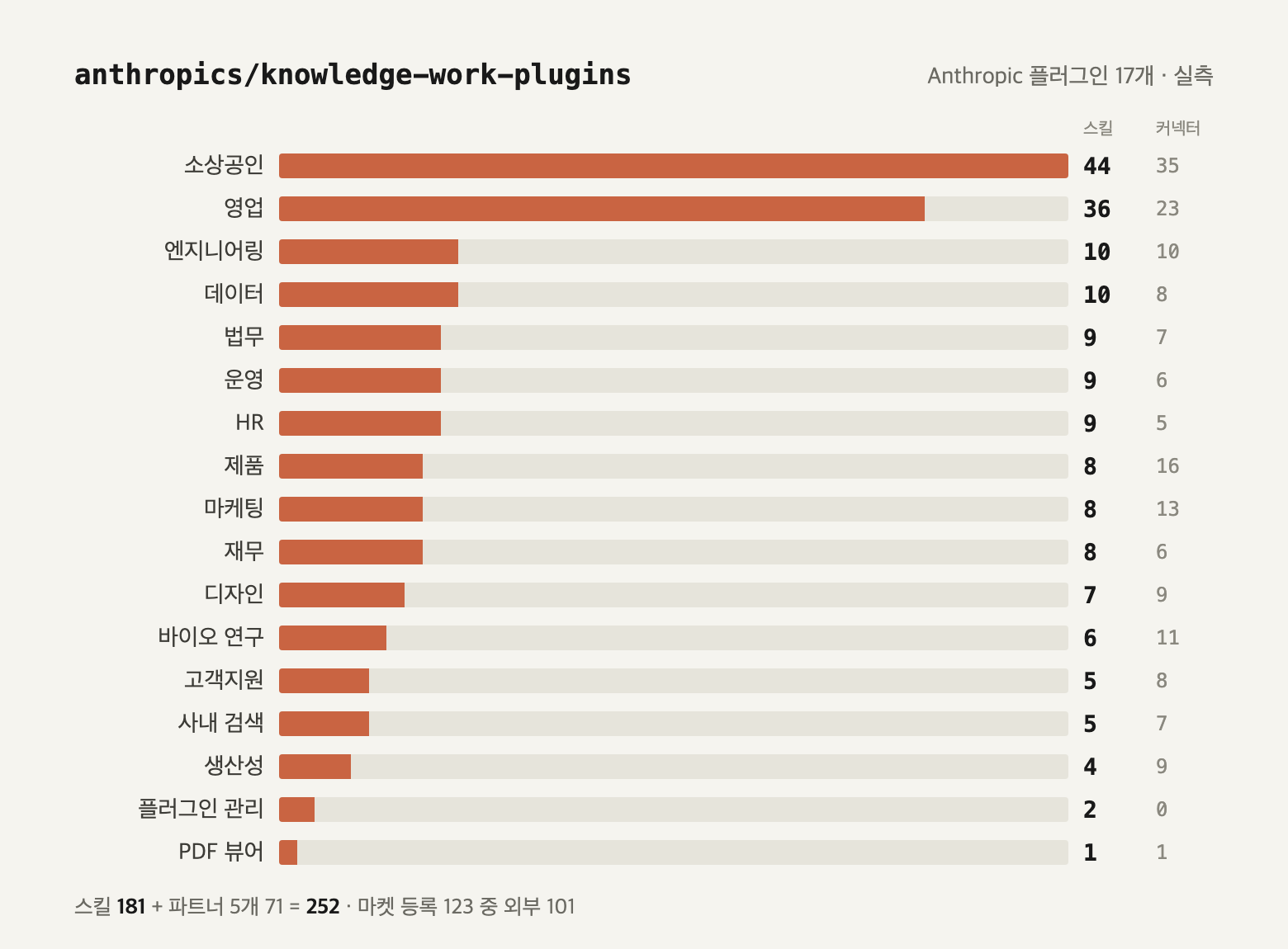
We're open-sourcing 11 plugins built and inspired by our own work:
| Plugin | How it helps | Connectors |
|---|---|---|
| productivity | Manage tasks, calendars, daily workflows, and personal context so you spend less time repeating yourself. | Slack, Notion, Asana, Linear, Jira, Monday, ClickUp, Microsoft 365 |
| sales | Research prospects, prep for calls, review your pipeline, draft outreach, and build competitive battlecards. | Slack, HubSpot, Close, Clay, ZoomInfo, Notion, Jira, Fireflies, Microsoft 365 |
| customer-support | Triage tickets, draft responses, package escalations, research customer context, and turn resolved issues into knowledge base articles. | Slack, Intercom, HubSpot, Guru, Jira, Notion, Microsoft 365 |
| product-management | Write specs, plan roadmaps, synthesize user research, keep stakeholders updated, and track the competitive landscape. | Slack, Linear, Asana, Monday, ClickUp, Jira, Notion, Figma, Amplitude, Pendo, Intercom, Fireflies |
| marketing | Draft content, plan campaigns, enforce brand voice, brief on competitors, and report on performance across channels. | Slack, Canva, Figma, HubSpot, Amplitude, Notion, Ahrefs, SimilarWeb, Klaviyo |
| legal | Review contracts, triage NDAs, navigate compliance, assess risk, prep for meetings, and draft templated responses. | Slack, Box, Egnyte, Jira, Microsoft 365 |
| finance | Prep journal entries, reconcile accounts, generate financial statements, analyze variances, manage close, and support audits. | Snowflake, Databricks, BigQuery, Slack, Microsoft 365 |
| data | Query, visualize, and interpret datasets — write SQL, run statistical analysis, build dashboards, and validate your work before sharing. | Snowflake, Databricks, BigQuery, Definite, Hex, Amplitude, Jira |
| enterprise-search | Find anything across email, chat, docs, and wikis — one query across all your company's tools. | Slack, Notion, Guru, Jira, Asana, Microsoft 365 |
| bio-research | Connect to preclinical research tools and databases (literature search, genomics analysis, target prioritization) to accelerate early-stage life sciences R&D. | PubMed, BioRender, bioRxiv, ClinicalTrials.gov, ChEMBL, Synapse, Wiley, Owkin, Open Targets, Benchling |
| cowork-plugin-management | Create new plugins or customize existing ones for your organization's specific tools and workflows. | — |
Install these directly from Cowork, browse the full collection here on GitHub, or build your own.
Install plugins from claude.com/plugins.
# Add the marketplace first
claude plugin marketplace add anthropics/knowledge-work-plugins

# Then install a specific plugin
claude plugin install sales@knowledge-work-plugins
Once installed, plugins activate automatically. Skills fire when relevant, and slash commands are available in your session (e.g., /sales:call-prep, /data:write-query).
Every plugin follows the same structure:
plugin-name/
├── .claude-plugin/plugin.json   # Manifest
├── .mcp.json                    # Tool connections
├── commands/                    # Slash commands you invoke explicitly
└── skills/                      # Domain knowledge Claude draws on automatically
- Skills encode the domain expertise, best practices, and step-by-step workflows Claude needs to give you useful help. Claude draws on them automatically when relevant.
- Commands are explicit actions you trigger (e.g.,
/finance:reconciliation,/product-management:write-spec). - Connectors wire Claude to the external tools your role depends on — CRMs, project trackers, data warehouses, design tools, and more — via MCP servers.
Every component is file-based — markdown and JSON, no code, no infrastructure, no build steps.
These plugins are generic starting points. They become much more useful when you customize them for how your company actually works:
- Swap connectors — Edit
.mcp.jsonto point at your specific tool stack. - Add company context — Drop your terminology, org structure, and processes into skill files so Claude understands your world.
- Adjust workflows — Modify skill instructions to match how your team actually does things, not how a textbook says to.
- Build new plugins — Use the
cowork-plugin-managementplugin or follow the structure above to create plugins for roles and workflows we haven't covered yet.
As your team builds and shares plugins, Claude becomes a cross-functional expert. The context you define gets baked into every relevant interaction, so leaders and admins can spend less time enforcing processes and more time improving them.
Plugins are just markdown files. Fork the repo, make your changes, and submit a PR.